What do the five levels actually mean?
The level is a label the component chose when it wrote the event, and it describes what happened to that component — not what it means for you. Critical means something could not continue and lost state. Error means an operation failed while the system carried on. Warning means something was noticed. None of them is a verdict on your PC’s health.
| Level | What the component is saying | How often it matters |
|---|---|---|
| Critical | It could not continue, and state or data was lost. Kernel-Power 41 after an unclean shutdown is the archetype. | Rare, and worth reading every time |
| Error | An operation failed. The service, driver or program usually recovered or retried. | Common. Matters only alongside a real symptom |
| Warning | Something was noticed and may become a problem — a retry, a timeout, a threshold approached. | Mostly noise. Worth reading when it repeats |
| Information | Something worked. Started, stopped, installed, connected. | Useful as context around a failure, never on its own |
| Verbose | Diagnostic detail for developers of that component. | Not shown by default, and correctly so |
Why is a healthy PC full of red errors?
Because Windows is thousands of components that log independently, and most of them treat “I tried something and it did not work, so I did it another way” as an error worth recording. On a normal machine that happens dozens of times a day, and nothing is wrong.
The pattern is familiar once you have seen it: a permission check fails and the component falls back to a different account; Wi-Fi re-associates while roaming and logs a disconnect; the time service asks for the time before the network is ready and retries eight seconds later. Each one is red. All of them are the system working as designed.
This is why the instinct to “clean up the errors” leads people to registry edits and service tweaks that fix nothing and sometimes break something. An event log is a diary, not a fault list.
Which entries are safe to ignore?
These show up on virtually every Windows machine and almost never mean anything. This is the complete list ErrorAnalyser hides in “Relevant only” mode, published in full and grouped by why each group is harmless — so the reasoning is checkable rather than a matter of trust.
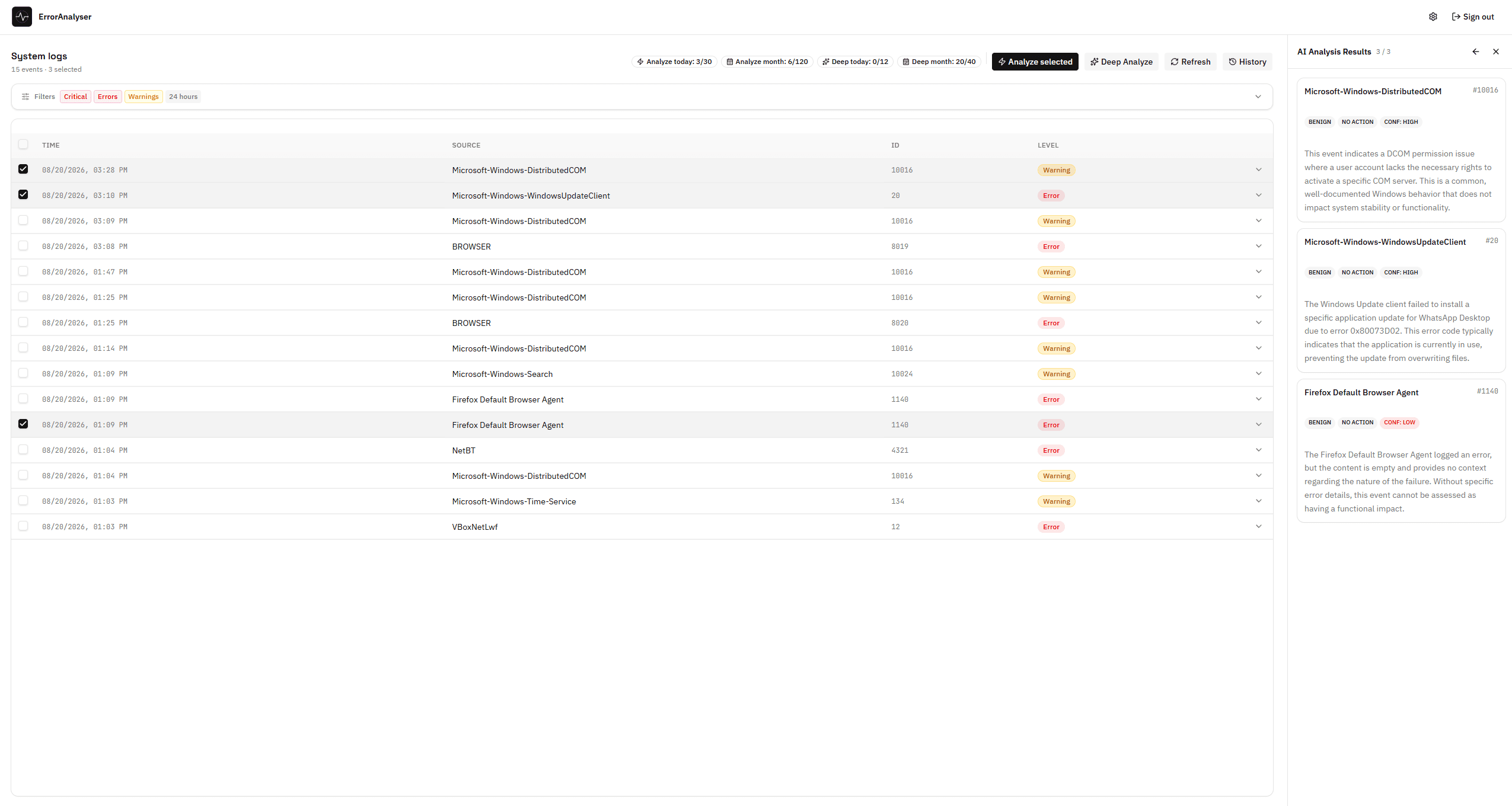
The most-worried-about entry on the list, in practice: DistributedCOM 10016, marked benign with no action needed. A verdict of “this is nothing” is a useful answer, and it is the one most of these entries deserve.
Services and system lifecycle
Windows narrating its own normal operation: services starting and stopping, the machine booting, sleeping and waking, drivers installing.
DCOM permission warnings
A permission check failed on a component that carried on regardless. Microsoft documents these as by design; the registry surgery people perform to silence them changes nothing.
Network and time
Transient by nature. Wi-Fi roams between access points, the time service retries before the network is up, a DNS lookup times out once and succeeds on the next try.
Indexing, licensing, installers and reporting
Background housekeeping that logs loudly: the search indexer restarting a filter host, activation checking a licence, an installer reporting each phase of a routine install, error reporting filing a duplicate of a crash already recorded elsewhere.
Routine security auditing
Successful logons, logoffs and privilege assignments. These are audit records of things working, not of things failing — note that failed logons (4625) are deliberately absent from this list.
Ignore does not mean forever
An event on this list is harmless as background noise. The same event can still be a clue if it suddenly starts appearing hundreds of times an hour, or clusters around the exact minute your PC froze. Frequency and timing outrank the list.
Which entries deserve attention?
These are the entries worth reading properly. Not because they always indicate a fault, but because when something is genuinely wrong, the evidence is usually one of these.
| Event | Meaning | What it points at |
|---|---|---|
| Kernel-Power · 41 | The system rebooted without shutting down cleanly. | A crash, a power loss or a hard freeze — the starting point for any restart investigation |
| EventLog · 6008 | The previous shutdown was unexpected. | Confirms the same event from the log service, with the time it went down |
| BugCheck · 1001 | A blue screen occurred, with the bug-check code. | A real kernel crash, and a memory dump you can read |
| Application Error · 1000 | A program crashed, naming the faulting module. | One application, not the system — the faulting module is the lead |
| Service Control Manager · 7031 / 7034 | A service terminated unexpectedly. | Something that should stay running keeps dying |
| WHEA-Logger · 18 | The hardware reported an uncorrected error. | The most serious entry on this list — genuine hardware trouble |
| Ntfs · 55 | File system structure damage was detected on a volume. | A disk worth checking, and backing up first |
| Disk · 51 / 153 | An error occurred during a paging or I/O operation. | A drive or cable retrying — watch for repetition |
| WindowsUpdateClient · 20 | An update failed to install. | Update trouble, with the failure code attached |
| Security-Auditing · 4625 | A logon attempt failed. | Access, not malfunction. Normal in ones, interesting in hundreds |
How to judge an event that is on neither list
For anything not on either list, three questions settle it almost every time — and all three are about context, not about the event.
- Does it line up with the symptom? Note the minute the problem happened, then look at what the log recorded in that minute. An error at 14:32 and a freeze at 14:32 are related; an error at 03:10 while you slept is not.
- Does it repeat, and is the rate changing? Once is an incident, and Windows handles incidents. The same event every few minutes, or forty times more often than last month, is a pattern.
- Was it always there? Filter the same log to a month ago. If your alarming error was also happening every day back when the machine was fine, it is not what changed.
When the answer to all three is “no”, you have found background noise, whatever colour the icon is. When one of them is “yes”, you have a lead — and the next step is usually to read what surrounds it in time, which is covered in how to read Event Viewer logs.
A note on Event ID numbers
An Event ID is only unique within its source. 1001 from BugCheck is a blue screen; 1001 from Windows Error Reporting is a routine crash report about the same incident. Always search for the pair — source and ID together — never the number alone.