What does ErrorAnalyser actually do?
ErrorAnalyser is a desktop app for Windows 10 and 11 that reads the Windows Event Log — the record your PC already keeps of everything that goes wrong — and turns it into a plain, filterable list, with crashes, shutdowns and hardware errors put first. You start an analysis of those top problems, or of the entries you select yourself, and an AI model explains what each one means and what to do about it.
The information was never hidden. Windows has shipped Event Viewer for decades, and everything ErrorAnalyser shows you is sitting in it right now. The problem is that the entries are written for the developers of the component that failed: Event ID 10016 from DistributedCOM is a real sentence to somebody, and nonsense to everybody else. That translation gap is the entire product.
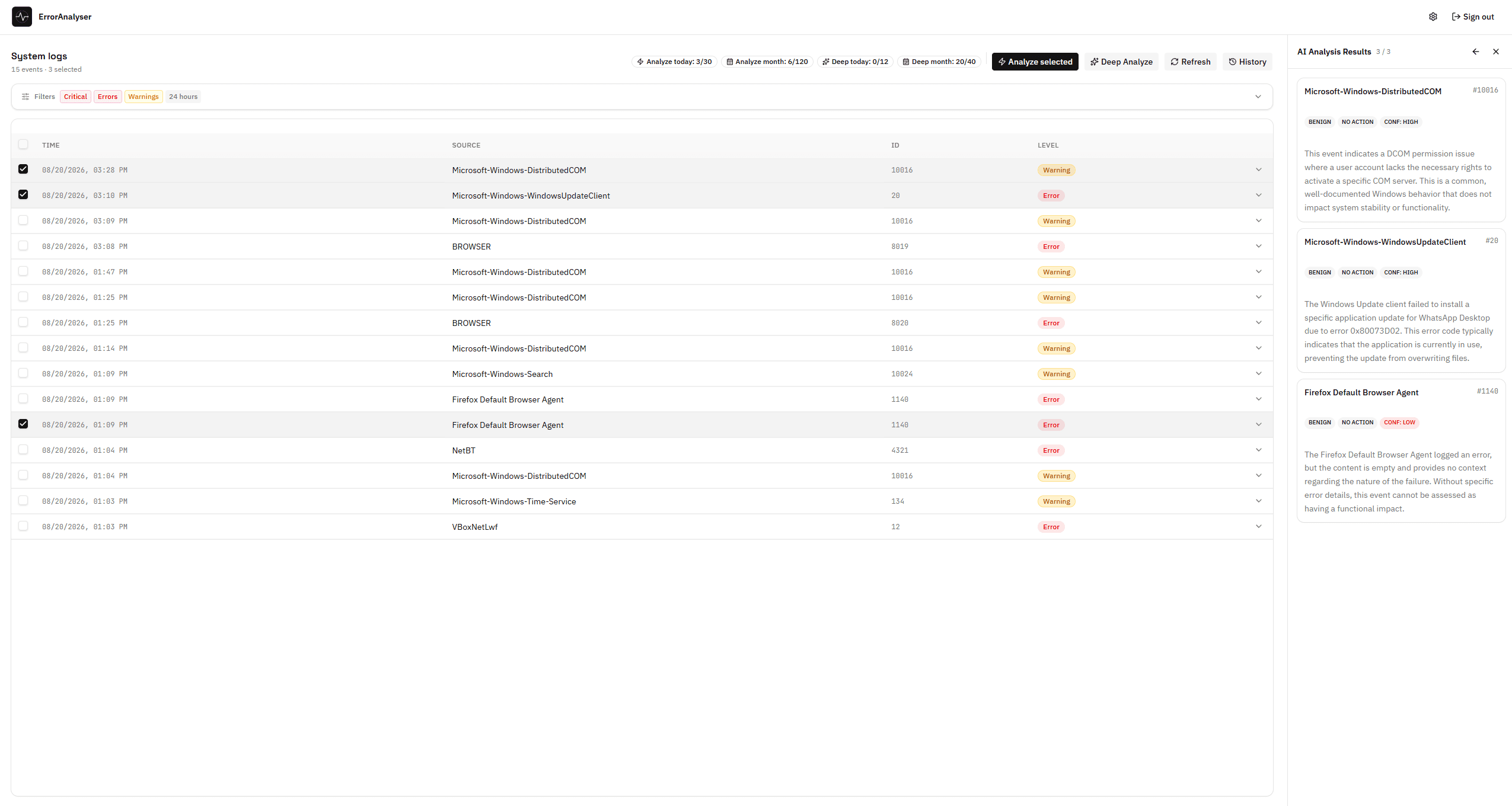
The same events Event Viewer holds, with the explanation beside them. The three selected entries here — DistributedCOM 10016, a Windows Update install failure and a Firefox Default Browser Agent error — all get the honest verdict: benign, no action needed.
What happens when you press Analyse?
Nothing leaves your computer until you start an analysis. When you do, these fields are sent for each error it covers: its Event ID, the name of the source that logged it, its level, and the error message text, truncated. When errors are checked together for a common cause, the time each was logged is sent as well.
On your PC
The log is read locally
ErrorAnalyser asks Windows for the events you filtered for, using the same read-only interface Event Viewer uses. Nothing is transmitted at this stage — not even if you leave the app open all day.
Our backend
Only the errors you analyse are sent
For each error in the analysis — the ones you picked, or the three the app lists as your top problems: its Event ID, the name of the source that logged it, its level and the message text (truncated). When errors are checked together for a common cause, the time each was logged goes too. The backend first checks whether an identical error has already been explained, so common errors cost nobody a second analysis.
Google's Gemini API
The explanation is generated
New errors go to Google’s Gemini API, which writes the explanation and the fix steps. We use the paid API tier, under which Google does not use submitted content to train its models.
The answer comes back into the app, not into a browser tab. Identical errors are recognised by a one-way hash of their content, so aKernel-Power 41 that thousands of people have already hit is answered from cache instead of being sent anywhere again.
The full data path is written down
Every field that is transmitted, every field that never is, and what happens to the analysis afterwards is listed on Is ErrorAnalyser safe? — including the parts that are worth being cautious about.
Which logs does it read?
ErrorAnalyser reads the three Windows logs where problems are actually recorded: System, Application and — only if you ask for it — Security. It reads them the way Event Viewer does, without modifying, clearing or deleting anything.
| Log | What lives there | Notes |
|---|---|---|
| System | Drivers, services, disks, power, the kernel. Nearly all crash and restart evidence. | Readable without administrator rights |
| Application | Crashed programs, installers, database and indexing components. | Readable without administrator rights |
| Security | Logon attempts and audit records. | Windows only lets administrators read this one — that is a Windows rule, not ours |
What does it cost?
Looking at your errors — browsing, filtering, history — is free forever and does not expire, and one diagnosis is free too: the app explains your three most important problems and checks whether they share a cause, so you can see what the analysis gives you before deciding. The paid Pro plan ($9.99 per month) exists for one reason: AI analysis costs us money per request, so beyond that first diagnosis it is metered.
| Free | Pro | |
|---|---|---|
| Browse your Windows errors | Yes | Yes |
| Error history | Yes | Yes |
| Advanced filters | Yes | Yes |
| AI analysis | 3 errors, in your free diagnosis | 30 per day · 120 per month |
| Deep Analysis | Once, in your free diagnosis | 12 per day · 40 per month |
The free diagnosis is a one-off allowance, not a timed trial: nothing expires by date, and nothing that works today quietly stops working tomorrow. There is no upsell dialog when you open the app — the Pro offer appears under the result of your free diagnosis, and when you ask for another analysis after it. If the free view answers your question, that is a complete outcome — see the pricing page for the exact limits.
What ErrorAnalyser is not
ErrorAnalyser is a reading tool, not a repair tool. It is worth being explicit about the things it deliberately does not do, because most software in this category claims all of them.
- It does not clean, optimise or repair anything. No registry cleaning, no junk-file scan, no “1,247 problems found”. It shows you what Windows recorded and explains it.
- It never changes your system by itself. Fix steps are instructions for you to follow, deliberately. A tool that edits your system based on an AI guess is a worse idea than the problem it is solving.
- It does not read crash dumps. After a blue screen Windows writes a memory dump to
C:\Windows\Minidump. Reading those is a different job — BlueScreenView and WhoCrashed do it well, and we say so on the alternatives page. ErrorAnalyser reads the event log, which records that the crash happened and what surrounded it. - It is not a monitoring or SIEM tool. It looks at one machine, on demand. It does not collect logs from a fleet of servers, raise alerts, or retain events centrally.
- It is not magic. An AI explanation of an event is as good as the event. Some Windows errors are genuinely ambiguous, and when that is the case the honest answer is a short list of things to check, not a confident diagnosis.
Who is it for?
Two kinds of people, for two different reasons — and if neither describes you, you probably do not need this app.
People whose PC is misbehaving and who do not want to spend an evening on a forum thread from 2017. Something crashes, restarts, or freezes; the log knows something about it; the app reads the log and tells you in a sentence what it found.
People who already open Event Viewer and simply want the same information faster: filters that survive a refresh, sources read live from the machine, and a plain-language second opinion on an event ID they have not seen before.